How to connect a BRAVIA TV, soundbar, and another input device using HDMI cables
How to use an HDMI cable to connect your TV, soundbar, and another input device (such as a Blu-ray Disc™ player, CATV tuner, or game console) that support an eARC or ARC connection.
- The terminal locations differ depending on your soundbar. Refer to the operating instructions for more information. Manuals, specifications, and warranty information for your Sony product are available online.
- Depending on the model, it may be necessary to switch the soundbar settings to TV after connecting. For details on how to operate your soundbar, refer to the instruction manual.
- If the soundbar comes with a subwoofer, avoid leaving items on top of the subwoofer. The subwoofer produces vibrations, so any items placed on top of it may fall off.
- If your TV and soundbar have HDMI input terminals that support the Enhanced Audio Return Channel (eARC) or Audio Return Channel (ARC) feature, those terminals will be labeled eARC or ARC.
Soundbar + TV + Another audio device
Check the HDMI terminal
Check if the HDMI output terminal of the soundbar bears text such as eARC/ARC or ARC, and then select one of the following:
Both TV and soundbar support eARC
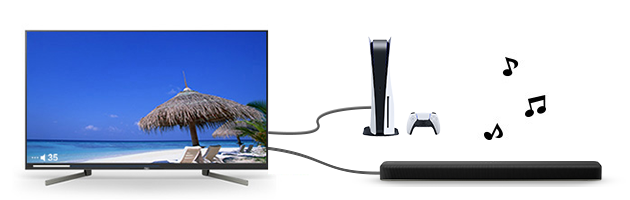
Only the TV or soundbar supports eARC, or both do not support eARC (but do support ARC)
Register your product
Get access to all information, keep your product up to date and enjoy great deals
Sony Community
Visit our Community and share your experiences and solutions with other Sony customers
Contact support
Contact your Sony Support team
Repair, Warranty & Spare Parts
Book, track or maybe even avoid a repair
Support by Sony (Mobile App)
Never miss an update again! Find information and receive instant notifications about your product

